What do think is the best time to do a weekly review? I have set the alarm on Saturday at 8 AM for a point in time for reflection and introspection. Maybe a morning during the weekend will be a good time for a weekly review?
Scan through the appointments and notes in the Moleskine notebook that have been during the week. Go back a couple of weeks to see if I have missed something and browse ahead a couple of weeks in the calendar to see what is coming up in the near future.
I am struggling with my spring cleaning. I have now archived all my email messages in order to start from scratch with an empty inbox.
Next step is to take care of my in-basket. I will get inspiration and energy from reading Nick Cernis's post, The Importance of Abandoning Crap and his e-book, Todoodlist. [Editor's note & full disclosure: This is an affiliate link.]
It is time to spring forward, jumping on the springboard and start getting busy with spring cleaning... I have as a goal to get everything in the right buckets and to have a clean working space within four weeks.
On May 7 is my 8th blogiversary and time for the annual blog report.
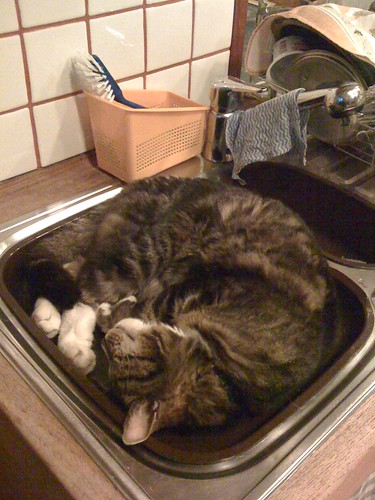
Morris will help me with the cleaning!
I have had my iPhone for about a month now and I am slowly getting used to it. I see it more as a multi-tool than a regular mobile phone. [Editor's note: Do you use MobileMe? I got a free trial for 60 days. I am not sure that I will continue with this service.]
In order to get back on track with my workflow, I really have to take time for my weekly review. I recently joined the "OProducers @ OList.com" and I look forward to get tips and suggestions on worklife productivity.
scyphers says: Tips for managing time: (OpenForum) Recap; Actual inbox, empty email, mindmap, small tasks, take notes, always improve (1st October 4:19, Tweetmeme / Twitter.)
Martin, good article! I have tried, but I find it impossible to a zero inbox -- or even close to zero, say 30 unread emails. Unfortunately, my unread emails number in the 3-figures or 4-figures. Of course, most of those are monitoring emails, such as Google Alerts, or newsletter subscriptions, or email notifications about comments on my various blogs. I've tried setting up special folders and automatically pushing certain emails to those folders so I can review them later. That helps. But even so, unread emails just accumulate in my inbox. Then eventually they get archived, and that helps keep the numbers down. Of course, my business is mainly Web-based and 99% of everything we do involves email. But I wonder if others have the same problem? -- Anita (Open Forum, idea hub - topic: innovation, October 2009.)
As I said in my post, I have struggled with maintaining an empty email inbox for a long time. At the moment, I have 8794 messages in the inbox... I have to archive them and start from scratch again. I am sure that the GTDInbox is a great application and solution to this problem. Please read, Why Email is Addictive (listen to the rats), for a possible explanation to the email "problem"...
[Editor's note: I started to write a draft of this post on 08/02/09. It has taken a long time to "chew", process & clarify stuff. Due to the "organized chaos" I am going back and forth between the different steps of the workflow process. I am often trying to collect, process, organize, review and do things at the same time! I am feeling a bit more at ease now when I have finished reading David Allen's book, Making It All Work: Winning at the Game of Work and Business of Life. The book has given me new fuel and energy to kick-off this ongoing journey of getting things done. Let's roll & pluck the day! Please feel free to join the conversation on GTD, productivity best practices, worklife, etc.! At the moment, I am especially interested to receive tips on podcast shows on this topic.]
I have been thinking of writing a longer post on my development of my worklife for some time. One big part of improving my productivity is clear the workspace and to set up the right "buckets". I have a picture clear on how to create a good workflow process, but I get overwhelmed now and then about all my old stuff that I have to go through. I have spent several days of my "vacation" to clean up things and I am starting to see the "light in the tunnel"...
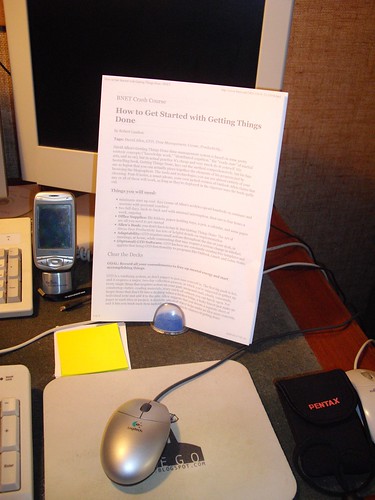
This is picture of Morris the cat stretching out on the computer desk. The photo is taken in the beginning of 2009 (February). I had plenty of piles on the desk and in the in-basket.
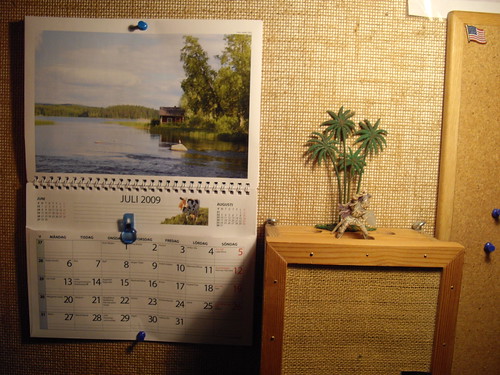
My bulletin board. The toy crusader is from my childhood. He has misplaced his lance and horse, but he will continue his fight... Do you know where I could get a Betsy Ross flag pin?
Picture of Morris the cat. 2009 overview calendar.
I start out the week on Monday morning by listening to David Stiernholm's podcast with "tips on how to create good structure and efficient work procedures for you and your organization." The weekly newsletter includes a PDF and an audio file (MP3).
I will start to take time at the end of the week with a review and a brainstorming session. I know that I have been procrastinating to get started due to all the old stuff that I have to get through before I could get ahead and continue forward. I have been looking for the new "ultimate" and cool gadget in order to motivate myself to dig into the piles of stuff. I have to go through a kind of mental "shock therapy," collecting all the old stuff and dump into the in-basket and then "force" myself to go through it, piece by piece. I have been spending some time this summer "setting up the right buckets" and going through "ancient archives" at the same time. I know that I will fall off the "wagon" now and then and it will probably take a year or two before I have integrated my personalized productivity habit so it becomes a natural part of my worklife.
Here is a list of things that I will be dealing with in the future:
Desks:
Keep the computer desk in tidy fashion and give the in-basket a "VIP" position on it.
Start cleaning off the mahogany desk, including the in-basket. Should I have reference material here in the study room?
Go through the computer desktop on a regular basis. Keep files "fenced in". Look at the wallpaper and get inspired!
I recently purchased GoalEnforcer. I will use it as a combined project management / mindmapping / brainstorming tool. I will play around with this program during this autumn.
I will start to use and review GTDagenda sometime in the near future.
I have started to use GTDinbox, but I have to get back to scratch regarding the inbox again. I had >22,500 email messages at one time. I had to do dump them into an archive. I now have >6000 email messages in the inbox. I should visualize the stack of 6000 papers and get going... ;)
I will come to grip of the situation and acquire an insight of my workstyle. According to ACCO Brands Corporation's workstyle finder, I am classified as follows:
Expressive Work Style
You are a free spirit with a plan. You know what works for you, and you build your work life around your individual needs. You know where you're going, and you have a good idea of how to get there, but you're flexible -- you're not afraid to take a few side trips along the way. When a project is important to you, you are very organized and efficient and manage your time well. You recognize the equal importance of appearance and content, and you strive to balance the two in everything you do. You pick and choose what you are going to pay attention to, depending on what priority is at the top of your list on any given day. (ACCO.com, "workstyle finder survey results.")
I want to end this post with a photo of my new favorite productivity tool... Pico Pen!
“Herding Cats” is an expression used often in Project Management. It refers to a task that is extremely difficult, or impossible, to do because of people, or variables, constantly in flux and uncontrollable. There is a popular EDS commercial on YouTube with modern “cat herders”.
People-Factors
Project Managers often have to deal with things that should be straightforward, but they become unbelievably difficult due to the people-factor.
Here is an example: you need to get someone to sign a piece of paper to get something done. Everything has been approved by those on high and all that is needed is one single signature by a finance dweeb. But he refuses. Fear of making a mistake? An uncontrollable desire to prove that he can control time and space? It could be anything.
It's like trying to stand cooked spaghetti on end.
Controlling Email
In personal productivity a great example is email. There are hundreds, thousands, tens of thousands… well… there is at least more than one book that will teach you how to get control of your work email. Not those jokes that get forwarded, not the links to great YouTube videos, like the one above, and not pictures of the family. Real work email.
The Four D’s
I use the Delete, Delegate, Defer, or Do empty-email-inbox-process. I keep my inbox empty except for those emails that still need an action. Everything else has been deleted, or at least most of them, delegated to the right person, deferred or moved into a to-do file or to the appropriate project file or it falls into the “do” category.
“Do” means that you either reply to the email or take the action required by the email. This is best if the action required takes only a moment or two, or if it is actually urgent and important.
When you go through your email and do one of these four actions quickly and properly, you will never spend more than one hour in the morning and one hour in the evening. And you will have an empty email box no matter how much work you have.
Cat Herding Emails
How is this like cat herding, I hear you ask. Well, if you are like me, you have more than one urgent and important email that comes in. And it seems as if urgent emails bounce back and forth just after you finish repling to one.
Urgent, urgent, urgent – in an infinite loop.
If you want to avoid this trap, program your email to be sent an hour after you begin. All of them.
Begin working on you email at 9am, send them all at 10am and then log off. When something actually important comes up, let people know that they can call you – but only if it is really important (and don't be afraid to use your voicemail).
Managing Unstable Environments
“Cat herding” is managing extremely unstable environments through practice and persistence. You have to put it in place and stick with it.
How do you handle your “cat herder” situations? What kind of “cat herder” are you?
by Richard McLaughlin, a guest blogger helping Martin make it through summer.



 by
by 
![Reblog this post [with Zemanta]](http://img.zemanta.com/reblog_e.png?x-id=e1bcf8c0-9db2-409b-a3e9-65e7f819a067)


![Reblog this post [with Zemanta]](http://img.zemanta.com/reblog_e.png?x-id=9d296d88-ce05-4baa-9799-38cf76d0610d)


 . The book has given me new fuel and energy to kick-off this ongoing journey of getting things done. Let's roll & pluck the day! Please feel free to join the conversation on GTD, productivity best practices, worklife, etc.! At the moment, I am especially interested to receive




![Reblog this post [with Zemanta]](http://img.zemanta.com/reblog_e.png?x-id=47a8ff1a-fcb5-4003-8ec7-ac62fc4869e8)